Every business wants to build stronger customer relationships, increase repeat sales, and keep subscribers engaged. However, manually sending individual emails to every prospect as they move through different stages of their journey quickly becomes impossible as a business grows. This is why email marketing automation is an essential operational strategy.
Instead of composing one-off broadcasts, automated email marketing allows businesses to set up rule-based workflows that send the right message to the right person at the exact moment it matters most. Whether you run an ecommerce store, a software company, or a content site, automating your email communications creates consistent engagement without consuming your team's daily hours.
In this guide, we explain what email marketing automation is, how workflows operate, common campaign types, segmentation strategies, key benefits, and practical best practices to help you scale customer engagement efficiently.
What Is Email Marketing Automation?
Email marketing automation is a technology-driven method of sending targeted, timely, and personalized emails to subscribers automatically based on predefined triggers, schedules, or user behaviors, rather than sending messages manually.
With email automation, your communication system works in the background. When a user takes a specific action—such as subscribing to your newsletter, abandoning a shopping cart, or signing up for a software trial—your email automation software immediately delivers a relevant message tailored to that interaction.
How Does Email Marketing Automation Work?
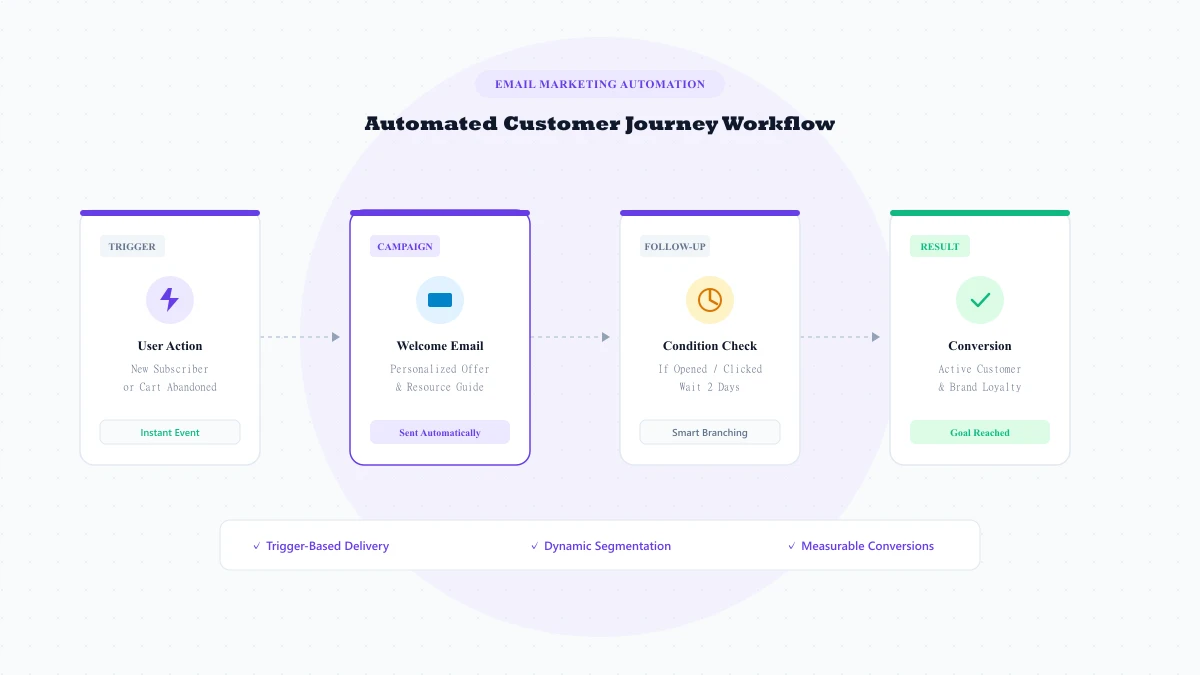
Every automated workflow follows a clear, step-by-step sequence that mirrors the customer journey:
- The Trigger: A specific event initiates the sequence, such as a form submission, purchase confirmation, or sign-up.
- Audience and Conditions: The system evaluates rules. For example, is the contact a first-time buyer or an existing subscriber?
- The Email: A personalized email template is populated with dynamic recipient details and delivered to the inbox.
- Subscriber Action: The recipient opens the email, clicks a link, completes a purchase, or ignores the message.
- The Next Step: Based on the user's action, the workflow branches into the next scheduled step or wait condition.
- Measurement and Optimization: The platform tracks delivery rates, open rates, clicks, and conversions to evaluate performance.
Common Types of Automated Email Campaigns
Businesses use automated email campaigns across every stage of the customer lifecycle:
- Welcome Emails: Sent immediately after someone joins your list to introduce your brand and deliver promised resources.
- Customer Onboarding Sequences: Guides new users through product tutorials and setup milestones during their first days.
- Abandoned Cart Emails: Reminders sent to shoppers who left items in their cart before completing checkout.
- Lead Nurturing Campaigns: Educational sequences designed to build trust with prospective clients by answering common questions.
- Product Update Announcements: Scheduled notices informing customers about new features, improvements, and releases.
- Re-Engagement Emails: Automated win-back campaigns sent to subscribers who have been inactive for 60 or 90 days.
- Customer Follow-Ups: Messages sent a few days after product delivery asking for feedback or reviews.
- Post-Purchase Upsells: Recommending complementary products based on past orders.
- Newsletter Automation: Distributing recent blog posts or weekly roundups automatically via RSS feeds.
Benefits of Email Marketing Automation
Implementing email marketing automation software provides clear advantages for growing businesses:
- Saves Time: Once a workflow is activated, it operates automatically without ongoing manual effort.
- Ensures Consistent Communication: Every subscriber receives timely messages when interest is highest.
- Enables Precise Segmentation: Group subscribers by behavior, preferences, and purchase history.
- Delivers Personalized Messaging: Dynamic tags ensure recipients receive relevant information.
- Improves Customer Retention: Regular, value-focused touchpoints encourage repeat visits and orders.
- Provides Measurable Performance: Clear analytics reveal exact open rates, click rates, and revenue.
- Scales Effortlessly: Workflows handle thousands of subscribers without added labor costs.
Email Automation Workflows Every Business Should Consider
To help you get started with email workflow automation, here are two practical workflow examples:
Workflow 1: The New Subscriber Welcome Sequence
When a visitor subscribes to your newsletter or downloads a guide, you can guide them through a multi-step introduction:
- Trigger: Form submission on website.
- Immediate Email: Deliver the resource, introduce your mission, and suggest 2 helpful articles.
- Day 2 (Wait 48 hours): Send a useful educational email addressing a common customer challenge.
- Day 4 (Wait 48 hours): Introduce your core product and explain how it solves that challenge.
- Day 7 (Follow-up): Check in with an invitation to ask questions or explore your features.
Workflow 2: The Cart Recovery Sequence
For online retailers, recovering abandoned shopping carts is essential for maximizing revenue:
- Trigger: Shopper adds item to cart and leaves without purchasing.
- 1 Hour Later: Send a reminder showing the exact items left in the cart with a checkout link.
- 24 Hours Later: Highlight customer reviews or free shipping benefits.
- 48 Hours Later: Send a final reminder noting that cart items are held for a limited time.
Email Segmentation and Personalization
Sending identical broadcasts to an entire database is rarely effective. Different subscribers have different interests, budgets, and brand familiarity.
Audience segmentation allows you to group contacts based on clear criteria:
- Demographic Data: Location, job role, or language.
- Browsing Behavior: Categories viewed on your website or resources downloaded.
- Purchase History: First-time buyers, recurring clients, or VIP customers.
- Engagement Levels: Active readers versus inactive subscribers.
Combining segmentation with personalization ensures your emails feel relevant and helpful to every recipient.
Email Marketing Automation vs Manual Email Campaigns
The table below highlights how automated workflows compare with manual email broadcasts:
| Feature | Automated Email Marketing | Manual Email Campaigns |
|---|---|---|
| Sending Trigger | User behavior or schedule (automated) | Manual send by marketer |
| Delivery Timing | Instant when user intent is highest | Broadcasted at a fixed time |
| Time Required | Build once, runs continuously | Requires manual creation every send |
| Relevance | High (matched to individual journey) | General (sent to wide list) |
| Scalability | Scales effortlessly with growth | Requires continuous team bandwidth |
| Best Use Case | Onboarding, cart recovery, nurturing | One-time announcements, holiday sales |
How to Choose an Email Marketing Automation Platform
When selecting an email marketing platform, focus on platform features that support long-term growth:
- Visual Workflow Builder: Look for an intuitive canvas that makes designing multi-step sequences simple.
- Advanced Segmentation: Ensure you can filter contacts dynamically based on tags and activity.
- Responsive Email Designer: A clean drag-and-drop builder ensures emails render perfectly across devices.
- High Inbox Deliverability: Dedicated sending infrastructure and domain authentication (SPF, DKIM).
- Comprehensive Analytics: Real-time reporting on delivery rates, opens, clicks, and bounces.
- Transparent Pricing: Fair pricing tiers that scale predictably as your audience expands.
How LumaPush Helps With Email Marketing Automation
LumaPush is a customer engagement platform that combines email marketing, web push notifications and automation in one place.
Instead of managing separate tools with fragmented subscriber lists, LumaPush allows businesses to build coordinated customer journeys across multiple touchpoints. You can design responsive emails in our drag-and-drop studio, set up automated drip sequences on the automation engine, and pair email campaigns with instant browser notifications.
To see how multi-channel orchestration works, explore our guides on web push notifications and compare both channels in our web push notifications vs email marketing breakdown. You can explore all platform tools on the features page or check our flexible tiers on the pricing page.
Email Marketing Automation Best Practices
To maximize engagement and maintain high inbox placement, follow these fundamental rules:
- Use Clear Triggers: Ensure every automated workflow starts with a well-defined event matching user intent.
- Segment Contacts Early: Tag new subscribers by interest so you only send relevant follow-ups.
- Prioritize Reader Value: Every email should teach, inform, or solve a problem before asking for a sale.
- Personalize Thoughtfully: Use recipient names and relevant details naturally.
- Avoid Excessive Frequency: Space out follow-up emails by 2 to 4 days.
- Test Subject Lines Continuously: Test different subject lines and preview text to improve open rates.
- Keep Unsubscribe Options Clear: Always include an easy 1-click unsubscribe link to maintain sender reputation.
Frequently Asked Questions
What is email marketing automation?
Email marketing automation is the use of software to automatically send targeted, personalized emails to subscribers based on specific triggers, schedules, or user behaviors without manual intervention.
How does email automation work?
Email automation works by listening for predefined triggers (such as form sign-ups, page visits, or abandoned carts), evaluating segmentation conditions, and automatically delivering scheduled email sequences.
What is an automated email campaign?
An automated email campaign is a sequence of pre-written emails set up to deliver automatically to individual contacts when specific trigger events or milestones occur.
What are the benefits of email marketing automation?
Key benefits include saving operational time, maintaining consistent customer communication, delivering relevant personalized messages, improving retention, scaling outreach effortlessly, and providing measurable performance analytics.
What is the best email automation strategy?
The best strategy combines clear behavioral triggers, audience segmentation, high-value non-spammy content, optimal send frequency, and continuous testing of subject lines and conversion metrics.
Can small businesses use email automation?
Yes. Small businesses can set up simple welcome sequences, lead nurturing flows, and re-engagement campaigns with modern platforms like LumaPush without requiring technical development skills.
What is the difference between email marketing and marketing automation?
Traditional email marketing often refers to manual one-off broadcasts sent to entire lists. Marketing automation refers to systematic workflows that trigger dynamically based on individual subscriber behavior across multiple touchpoints.