Web push notifications are clickable alert messages sent directly to a user's web browser on desktop computers, tablets, and mobile devices. Unlike traditional mobile app alerts, web push notifications do not require visitors to download or install an application. As long as a visitor grants permission on your website, you can send them timely updates even when they are not actively browsing your site.
Website owners and marketers use web push notifications to bring visitors back, announce promotions, share fresh content, and re-engage customers without getting lost in crowded email inboxes or filtered by social media algorithms. In this complete guide, you will learn what web push notifications are, how they work, their key benefits, practical use cases, and best practices to engage your audience.
What Are Web Push Notifications?
A web push notification is a short, clickable message delivered to a subscriber's screen through their web browser. When clicked, it immediately takes the user to a specific destination URL on your website.
These alerts work across all major modern web browsers, including Google Chrome, Mozilla Firefox, Microsoft Edge, Opera, and Apple Safari on macOS and iOS. Because browser push notifications use open web standards, they function seamlessly across Windows, Mac, Android, and iOS devices.
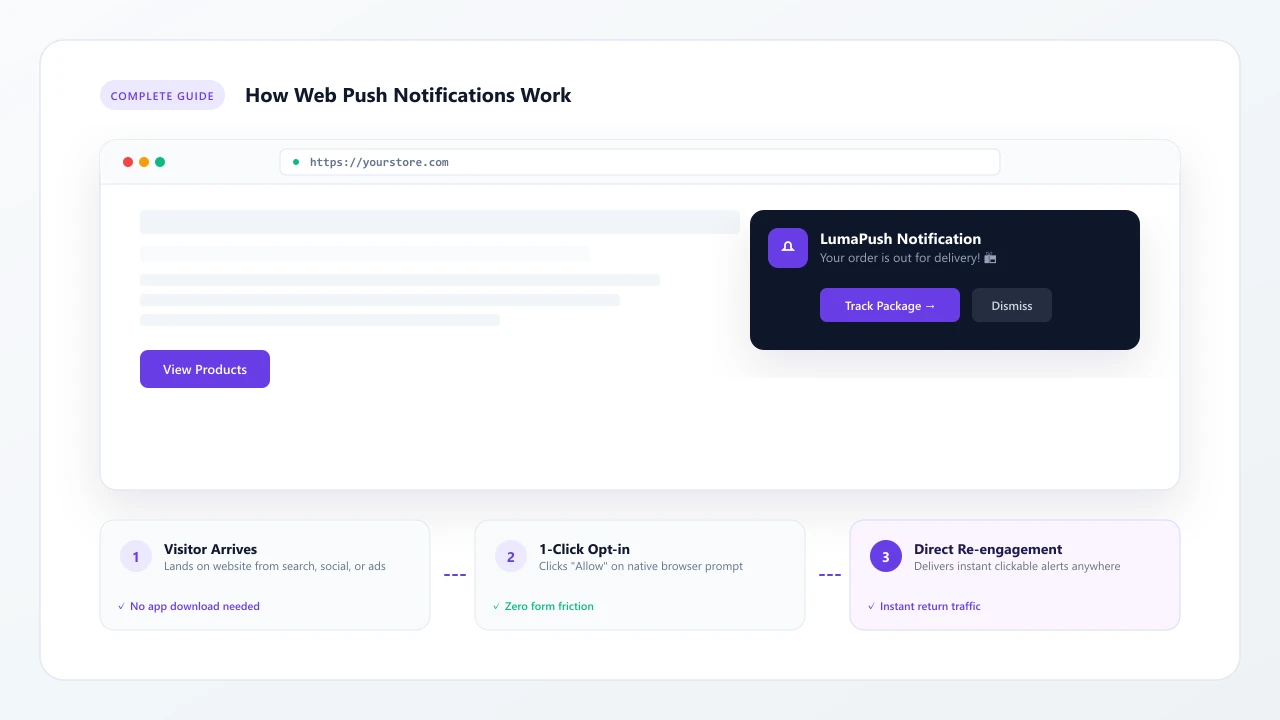
A typical web push notification includes a concise headline, a short text message, your brand logo, an optional banner image, and one or two clickable call-to-action buttons.
How Do Web Push Notifications Work?
Understanding how web push notifications work helps you set up an effective communication strategy. The process relies on browser Service Workers and secure push services.
Here is the process step by step:
- Visitor opens a website: A user lands on your website using a supported web browser.
- Website asks for notification permission: A browser prompt asks if the visitor wants to receive notifications (Allow or Block).
- Visitor subscribes: The user clicks "Allow" to subscribe with a single click, without typing an email address or personal details.
- Browser stores the subscription: The browser generates a unique cryptographic subscription token and registers a background Service Worker.
- Website sends a notification: You compose a campaign in your push notification software, which sends the payload to the browser push service (such as Google FCM or Apple Push service).
- Subscriber receives the notification: The push service delivers the alert to the subscriber's device, where the notification appears on screen.
- User clicks and returns to the website: Clicking the alert instantly opens the target webpage in their browser.
What Can You Use Web Push Notifications For?
Website push notifications are versatile tools across many industries. Popular use cases include:
- New Content: Alert subscribers the moment a new article, video, or podcast episode is published.
- Ecommerce Offers: Share limited-time discount codes, flash sales, and seasonal promotions.
- Product Launches: Inform customers about new product arrivals and major catalog additions.
- Abandoned Browsing: Re-engage shoppers who viewed specific categories or left products in their carts.
- Price Alerts: Notify shoppers when items on their wishlist drop in price or return to stock.
- News Updates: Deliver breaking stories and time-sensitive market alerts within seconds.
- Reminders: Send event reminders, webinar start times, and subscription renewal alerts.
- Promotions: Broadcast holiday specials and exclusive member-only deals.
- Customer Re-engagement: Bring inactive subscribers back with tailored recommendations.
Web Push Notifications vs Traditional Notifications
Here is how web push compares with other common messaging channels:
| Channel | App Needed? | Opt-In Effort | Delivery Speed | Best Use Case |
|---|---|---|---|---|
| Web Push | No | 1 Click | Instant | Real-time re-engagement without an app |
| App Push | Yes | Download required | Instant | Deep mobile application engagement |
| SMS | No | Phone number input | Instant | Critical security and urgent alerts |
| No | Email form fill | Minutes to Hours | Detailed newsletters and receipts |
Benefits of Web Push Notifications
Implementing a web push notification service provides clear advantages for growing websites:
- Direct Communication: Alerts appear right on screen, making them easy for subscribers to notice immediately.
- Fast Delivery: Messages reach devices in real time, making them ideal for time-sensitive updates.
- No Email Inbox Required: Notifications bypass spam filters, promotions tabs, and crowded inboxes.
- Easy Subscriber Collection: Visitors subscribe with one simple click. No forms or typing required.
- Segmentation: Group subscribers by device, location, browsing behavior, or tags to deliver targeted content.
- Automation: Create automated campaigns like welcome sequences and RSS blog feeds using automation tools.
- Engagement Tracking: Track deliveries, opens, clicks, and conversions to measure campaign effectiveness.
Web Push Notifications for Ecommerce
For online stores, push notification marketing serves as an automated sales assistant. Online retailers use browser notifications to recover abandoned shopping carts, announce flash sales, and alert shoppers when out-of-stock products return.
Because notifications appear directly on shoppers' screens, they prompt quick buying decisions without requiring customers to open their email accounts. Timing alerts around payday, weekends, or ending discounts helps maximize sales volume.
Web Push Notifications for Blogs and Publishers
Publishers, news sites, and bloggers rely on recurring traffic. Website push notifications allow publishers to build a direct audience that does not depend on search engine algorithm changes or social media reach.
When you publish a new article, you can send an alert immediately to thousands of readers. Automated RSS triggers can also broadcast new posts automatically as soon as they go live, driving steady traffic throughout the day.
How to Send Web Push Notifications
Setting up and sending web push notifications is straightforward:
- Select a push notification tool: Choose a trusted push notification platform that offers reliable delivery and audience segmentation.
- Connect your domain: Add a small JavaScript code snippet or CMS plugin to your website.
- Customize your opt-in prompt: Set up a custom prompt explaining what updates visitors will receive.
- Create your campaign: Write your headline, message body, add an image, and enter your link.
- Send or schedule: Send the notification to all subscribers or a specific segment immediately, or schedule it for later.
LumaPush is a customer engagement platform that combines web push notifications, email marketing and automation in one platform. With LumaPush, you can build custom opt-in prompts, deliver messages at high speeds, and manage all your subscriber communication from one place. Learn more on our pricing page.
Best Practices for Web Push Notifications
To keep subscribers engaged and minimize unsubscribe rates, follow these best practices:
- Keep Messages Short: Use clear headlines and short descriptions that are easy to read in a few seconds.
- Provide Clear Value: Ensure every message offers useful information, a helpful update, or a relevant discount.
- Use Relevant Timing: Send messages during active daytime hours in your subscribers' local time zones.
- Avoid Excessive Notifications: Do not overwhelm users with multiple daily messages. Stick to 1 to 3 targeted alerts per week.
- Segment Subscribers: Group subscribers by interests and behavior so they only receive content relevant to them.
- Test Different Messages: Test different titles, images, and call-to-action buttons to see what generates the highest clicks.
- Track Clicks and Engagement: Review campaign analytics regularly to refine your copy and timing.
- Give Users Control: Allow users to easily update their notification preferences or unsubscribe whenever they want.
Web Push Notifications vs Email Marketing
Web push notifications and email marketing work best when used together. Web push is ideal for short, urgent alerts and immediate actions like flash sales and breaking news. Email marketing is better suited for longer educational content, receipts, and detailed newsletters.
Combining both channels allows you to reach customers wherever they are. Read our detailed guide on web push notifications vs email marketing to see a full comparison, or explore our guide on email marketing automation to learn how to connect both channels.
Frequently Asked Questions
What are web push notifications?
Web push notifications are clickable alert messages sent from a website directly to a subscriber's web browser on desktop, tablet, or mobile devices, even when the website is not actively open.
How do web push notifications work?
When a visitor arrives on your website, their browser displays an opt-in permission prompt. If they click Allow, the browser creates a secure subscription token. When you send a notification, the browser push service delivers the alert to the user's screen.
Do users need to install an app?
No. Web push notifications work entirely through standard web browsers like Google Chrome, Apple Safari, Microsoft Edge, and Mozilla Firefox without installing any mobile application or software.
Can web push notifications work on mobile?
Yes. Web push notifications work on Android devices through modern mobile browsers and on iOS (iPhone/iPad) running iOS 16.4 or later when websites are added to the Home Screen.
Are web push notifications effective?
Yes. Because web push notifications bypass crowded email inboxes and spam folders, they appear immediately on user screens, delivering high click-through rates and timely re-engagement.
How do websites collect push subscribers?
Websites collect subscribers by displaying a 1-click browser permission prompt or a customized soft prompt explaining what updates the visitor will receive. Visitors become subscribers instantly with one click.
What is a web push notification service?
A web push notification service, such as LumaPush, provides the infrastructure, dashboard, subscriber management, segmentation, automated workflows, and analytics needed to schedule and deliver notifications to subscribers.